 Canada
 United States
 Bahamas
 Jamaica
 Trinidad & Tobago
 Antigua & Barbuda
 Barbados
 Anguilla
HRIS Meaning: The Plain-Language Guide

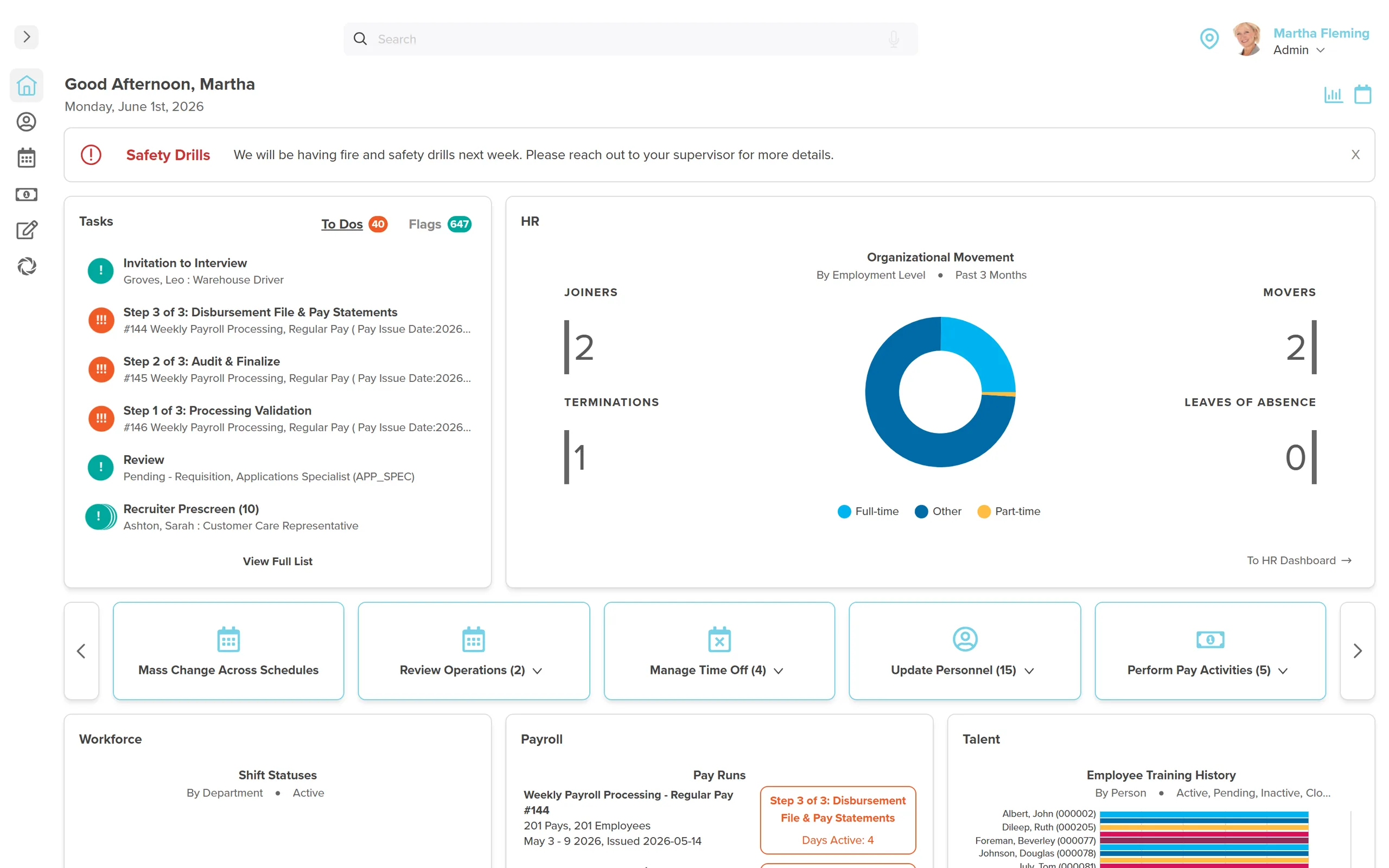
Most people who say "you need an HRIS" don't actually explain what one is. You have heard the acronym in vendor pitches, on LinkedIn, and probably in at least one board meeting. Somebody said you need one. Nobody explained what it actually is in words a normal person would use. So here is the HRIS meaning, in plain language.
An HRIS (Human Resource Information System) is software that stores, manages, and automates your employee data and HR processes. Think of it as the central database for everything about your people: personal details, job history, pay, benefits, time off, and compliance documents. Instead of that information living in spreadsheets, filing cabinets, email threads, and your HR manager's memory, it lives in one place.
- HRIS = Human Resource Information System. It is the central database for all employee information and HR processes.
- HRIS, HCM, and HRMS are different scope levels: HRIS is the foundation, HRMS adds payroll and time, HCM adds talent management and workforce planning
- Most businesses need an HRIS once they pass 50 employees (some sooner)
- Cloud-based HRIS pricing ranges from $5 to $30 per employee per month depending on the vendor and modules
- The real cost of not having one is harder to measure: compliance gaps, data errors, and HR time spent on tasks that should be automated
What is an HRIS?
An HRIS, or Human Resource Information System, is the central database of record for every employee's profile, position, compensation and employment history. Personal details, pay, benefits, time off and compliance documents live in one place instead of spreadsheets, filing cabinets and email threads. A true HRIS goes beyond storage and runs payroll, scheduling and talent processes against that same record. Workzoom is built as an HRIS in this fuller sense.
That is it. That is what an HRIS is. Everything else is details, and the details matter, but the core concept is simple: one system, all your people data, accessible when you need it.
What is the difference between HRIS, HRMS and HCM?
HRIS, HRMS and HCM describe three scope levels of the same software category. An HRIS covers employee records, org charts, reporting and document storage, while an HRMS adds payroll processing, time and attendance and scheduling. An HCM adds recruiting, onboarding, performance management, learning and workforce analytics on top of that. Vendors use the three terms inconsistently, so the feature list matters more than the acronym on the product page.
| Term | Stands For | What It Typically Includes | Best For |
|---|---|---|---|
| HRIS | Human Resource Information System | Employee records, org charts, basic reporting, document storage, benefits admin | Companies that need a people database and basic automation |
| HRMS | Human Resource Management System | Everything in HRIS + payroll processing, time and attendance, scheduling | Companies that want HR and payroll in one place |
| HCM | Human Capital Management | Everything in HRMS + recruiting, onboarding, performance management, learning, succession planning, workforce analytics | Companies that want end-to-end people management |
In practice, these distinctions have blurred. Most modern platforms marketed as "HRIS" actually include payroll and time tracking. Most platforms marketed as "HCM" include everything from hire to retire. The label a vendor chooses says more about their marketing department than their feature set.
Don't buy based on the acronym. Buy based on the feature list. Ask the vendor exactly what is included at your price point, because "HRIS" from one company might include more than "HCM" from another.
What does an HRIS include?
An HRIS includes employee records, payroll processing, time and attendance tracking, benefits administration, compliance reporting and employee self-service. Employee records hold personal details, compensation history and documents in one searchable file. Payroll draws on that same record instead of a separate data entry step. Time and attendance, benefits and self-service tools remove manual paperwork, while compliance reporting prepares the filings a growing company needs to submit on time.
Employee Records (The Foundation)
Every employee's personal information, employment history, compensation details, emergency contacts, and documents in one searchable database. No more digging through filing cabinets or searching email for that signed offer letter from 2023. Every record is timestamped, versioned, and accessible to the people who need it.
Payroll Processing
Most HRIS platforms now include payroll, or at least integrate with a payroll provider. The advantage of having payroll inside your HRIS is simple: employee data does not need to be entered twice. A salary change in the HR record automatically flows to the next pay run. A new hire's information populates payroll without a separate setup process.
Time and Attendance
Clock-in/clock-out, timesheet approvals, overtime calculations, and absence tracking. For companies with hourly workers, this is where the HRIS pays for itself fastest. A manual timesheet process at a 200-person company with 100 hourly workers generates roughly 5,200 timesheets per year. Each one needs to be collected, verified, approved, and entered into payroll. An HRIS does all of that electronically.
Benefits Administration
Employee enrolment, plan details, life event changes, and carrier feeds. Instead of HR manually updating the benefits provider every time someone gets married or has a child, the HRIS handles the notification. Some platforms include benefits marketplace features where employees can compare and select plans during open enrolment.
Compliance and Reporting
T4 generation, ROE preparation, and EHT calculation, combined with employment standards tracking and audit-ready records. For Canadian employers, this means the system knows which province each employee works in and applies the correct rules for statutory holidays, overtime thresholds, and leave entitlements. The HRIS generates and prepares these files; the employer submits them. When a filing deadline arrives, the data is already structured correctly.
Employee Self-Service
Employees update their own address, view their pay stubs, check their leave balance, and download their tax slips without calling HR. Self-service portals reduce HR inquiry volume by 40-60% according to most vendor studies, and the number is believable. "How many vacation days do I have left?" is still the most common question HR departments field.
What a Real HRIS Tracks (Beyond the Demo)
Most demos show you the surface: a clean employee profile, a pay stub, a leave request. What they don't show is the data model underneath. According to SHRM, the distinguishing mark of a mature HRIS is not feature count but structural integrity, specifically whether the system models the relationship between people and positions correctly.
A genuine HRIS tracks positions separately from people. That distinction matters more than it sounds. When someone leaves, the position doesn't disappear, it opens. When someone moves departments, a person-position record changes; the position's history and compensation band stay intact. When an org restructure happens, you can model it before it takes effect using effective dating, meaning changes are queued to apply on a future date without disrupting the current pay run.
The five elements that make this work in a well-designed HRIS: the organization unit (the department or cost center), the position (the job slot with grade and reporting line), the person (the individual's personal and employment record), the assignment (which person holds which position and when), and the pay element (what compensation is attached to the position or the assignment). When all five exist as distinct objects with their own history, you can answer questions like "what did this org look like 18 months ago" or "show me every position that changed compensation grade in Q3." When they're all collapsed into one employee record, those questions are unanswerable.
That's not a feature. It's architecture. And it's the thing most small-business HRIS platforms don't have, which is why they work fine at 50 employees and start breaking at 150.
When does a company need an HRIS?
Most companies need an HRIS once they pass 50 employees, though the real signal is a pattern rather than a headcount. Warning signs include HR spending more time on data entry than on people, and employee data spread across several spreadsheets. Other signs are a missed filing or employment standards complaint, and a headcount report that takes longer than five minutes to produce. For most companies, the shift from manageable to constant lands somewhere between 30 and 75 employees.
Here are the signals that spreadsheets are costing you more than they are saving.
- You have more than 50 employees. Below 50, a well-organized spreadsheet and a competent HR person can manage. Above 50, the volume of changes per month (new hires, terminations, salary adjustments, leave requests, benefits changes) exceeds what manual tracking can handle reliably.
- You operate in multiple provinces or countries. Different tax rules, different leave entitlements, different statutory holidays. A spreadsheet that works for Ontario breaks the moment you hire someone in B.C.
- Your HR person spends more time on data entry than on people. If your HR team spends 60% of their time updating records, generating reports, and answering "what's my balance" questions, you are paying HR salaries for data clerk work.
- You have had a compliance issue. A missed ROE filing, a wrong T4, an employment standards complaint about vacation pay. These are symptoms of a data management problem, not a people problem.
- You cannot produce a headcount report in under 5 minutes. If answering "how many people work here right now" requires opening three spreadsheets and cross-referencing, you need a system.
- Onboarding takes more than a week of paperwork. New hire forms, benefits enrolment, payroll setup, policy acknowledgments. If each new hire generates a stack of paper and a chain of emails, you are doing manually what an HRIS automates.
The real tipping point is not a headcount number. It is the moment your HR team spends more time maintaining data than using it. For most companies, that happens somewhere between 30 and 75 employees. That is the pattern we see across our Canadian client base: the break point is rarely the headcount on the org chart, it is the day the manual work crosses over from manageable to constant.
What does an HRIS cost in 2026?
An HRIS costs between $5 and $30 per employee per month in 2026, depending on the vendor and the modules included. Basic record keeping sits near the bottom of that range, and full suites with recruiting and analytics sit near the top. Workzoom prices each suite, HR, Payroll, Workforce and Talent, at C$4 per employee per month, and all four together at C$16 with a C$700 monthly minimum for organizations under 100 employees taking all four suites. A single suite carries a C$400 minimum, and implementation, migration, training and support are included.
Watch out for implementation fees. Some vendors charge $5,000 to $50,000+ for setup, data migration, and training. Others include implementation in the subscription. At Workzoom, for example, every suite is $4/employee/month with no setup fees and no contracts. That is not typical of the industry, but it is becoming more common as cloud platforms compete on accessibility.
The Hidden Costs
The subscription price is not the total cost. Ask about:
- Implementation fees: Can range from $0 to $50,000+ depending on vendor and complexity
- Per-module pricing: Some vendors price each module separately. Payroll is $X, time tracking is $Y, performance is $Z. The "starting at" price only includes the base module.
- Minimum employee counts: Some platforms require a minimum of 100 or 200 employees. Below that, you pay the minimum anyway.
- Annual contracts: Many vendors require 1 to 3 year commitments. Breaking a contract early often means paying the remaining balance.
- Data migration: Moving your data from spreadsheets or a previous system into the new HRIS. Some vendors include this, others charge by the hour.
What should Canadian employers look for in an HRIS?
Canadian employers should choose an HRIS that knows each position's province and applies that province's leave, overtime and holiday rules from policy set at implementation. The system should calculate CPP, EI and federal and provincial tax, and prepare T4 and Record of Employment files for the employer to submit. French self-service for Quebec staff and Canadian data storage matter as well. Workzoom meets each requirement and is Canadian-owned.
Source: Service Canada, how to complete the Record of Employment, read 2026-09-15.
Employment standards differ by province, so leave entitlements, overtime thresholds and statutory holiday pay change between Ontario, British Columbia, Quebec and every other province. An HRIS needs to track the province tied to each position and apply that province's rules to the person who holds it. One national default rule cannot serve an employer with staff in more than one province.
Two federal filings sit behind Canadian payroll. Employers report insurable earnings and hours on the Record of Employment, using the process in the Service Canada ROE guide above. They issue T4 slips at year end following the CRA Employers' Guide RC4120. An HRIS with Canadian payroll prepares both filings from the record it already holds, so the employer reviews and submits rather than rebuilding the data.
Data residency and language matter as well. Canadian employers should confirm where employee data is stored, and Quebec staff need self-service in French rather than an English-only portal. Workzoom stores data in Canada, offers French self-service and runs Canadian payroll alongside HR, workforce and talent from one record. See our guide to HRIS software for Canadian employers for the fuller picture.
Cloud vs On-Premise: Cloud Won
This used to be a real decision. It is not anymore. Over 95% of HRIS purchases in 2025 were cloud-based, according to Gartner. The on-premise model (where you install software on your own servers and manage it internally) still exists in legacy environments, but no new HRIS buyer should be considering it unless they have very specific data sovereignty requirements that cloud vendors cannot meet.
Cloud HRIS advantages that ended the debate:
- Automatic updates: Tax tables, legislative changes, and feature improvements deploy without your IT team touching anything
- Anywhere access: Employees and managers access the system from any browser, any device. Critical for remote and hybrid workforces.
- Lower total cost: No server hardware, no IT maintenance, no upgrade projects. The subscription covers everything.
- Faster implementation: No hardware to procure or install before configuration starts
- Better security (usually): Cloud vendors invest more in security infrastructure than most mid-size companies can afford internally
How to Evaluate HRIS Vendors
The HRIS market has hundreds of vendors. Narrowing the field is easier when you know what questions to ask.
Start With Your Must-Haves
Before looking at any vendor, list the 5 things you absolutely need. For most Canadian employers, that list looks something like: Canadian payroll (multi-province), time and attendance, leave management, employee self-service, and T4 generation and ROE preparation. If a vendor cannot do all five natively, they are out.
Ask About Canadian Compliance
Many HRIS platforms are built for the U.S. market and "support" Canada as an add-on. That means American tax logic with Canadian tables bolted on, no ROE generation, no provincial employment standards tracking, and limited or no French language support for Quebec. If Canada is your primary market, choose a vendor that built for Canada first.
Test the Payroll
Payroll is where integration matters most. If payroll is a separate module, a separate login, or a separate vendor, every pay run involves data flowing between systems. That flow is where errors enter. The strongest HRIS platforms process payroll natively, using the same employee data that HR maintains, with no export/import step.
Check the Implementation Timeline
Ask every vendor for a written implementation plan with the hours your own team must commit, not a duration from memory. A plan that runs to many months for a 200-employee company is telling you something about the system's complexity: legacy architecture, heavy customization requirements, or both.
The County of Renfrew, an Ontario municipal employer, onboarded 32 employees in 3 months using Workzoom with zero paper. That timeline reflects what clean implementation looks like when the HRIS architecture is sound: data goes in once, everything else flows from it.
Understand the Contract
Month-to-month is better than annual. Annual is better than multi-year. If a vendor requires a 3-year commitment, they are betting you will be too entrenched to leave when the price increases. That's not a contract. That's a hostage arrangement. Look for vendors that earn your business every month instead of locking you in.
The best HRIS for your company is the one where payroll, time tracking, leave management, and employee records share the same database. Every integration point between separate systems is a place where data breaks.
Small/Midsize vs Enterprise: Different Needs, Different Solutions
A 75-person company and a 5,000-person company both need an HRIS. They do not need the same HRIS.
Small and Midsize (50 to 500 Employees)
Priority: simplicity, speed, and cost. You need a system that works out of the box with minimal configuration. You probably do not need custom workflows, advanced analytics, or AI-powered succession planning. You need payroll that runs correctly, leave that tracks accurately, and reports that generate without a consultant.
At this size, all-in-one platforms offer the best value. Paying $4 to $15 per employee per month for a single system that covers HR, payroll, time, and benefits is almost always cheaper than assembling three or four point solutions.
Enterprise (500+ Employees)
Priority: configurability, global support, and advanced analytics. Enterprises typically need multi-country payroll, complex approval hierarchies, union management, advanced reporting, and integrations with ERP and finance systems. The HRIS at this level is part of a larger technology stack and must play nicely with existing tools.
Enterprise HRIS pricing reflects this complexity. Expect $15 to $30 per employee per month, plus implementation projects that can run into six figures.
The Bottom Line
An HRIS is not a luxury purchase or a "nice to have when we're bigger" item. It is the infrastructure that makes accurate payroll, compliant leave tracking, and reliable people data possible. Without one, you are relying on spreadsheets, memory, and luck. All three fail at scale.
Cable Bahamas, a telecom operator with roughly 850 employees, cut payroll processing time by 70% after centralizing HR and payroll in Workzoom. What took 5 days now takes 1.5 days, with 3 staff managing payroll for close to 1,000 people. That's the operational shift an HRIS enables: less time maintaining records, more time using them.
The market has matured enough that cost is no longer a valid excuse. Good HRIS platforms exist at $5 per employee per month. Some, including all-in-one platforms like Workzoom, start at $4 per employee per month with no setup fees and no contracts.
You got into HR to work with people, not to babysit spreadsheets and chase down missing forms. The right system hands that hour back. The question is not whether you can afford an HRIS. It is whether you can afford to keep operating without one.
See what an all-in-one HRIS looks like
Workzoom combines HR, payroll, workforce management, and talent in one platform. Built for Canadian employers with 50 to 5,000 employees. $4/employee/month per suite, no setup fees, no contracts, month-to-month.
Book a 30-Minute WalkthroughSee Workzoom in 30 minutes.
Real product, real questions, no slides. Starts at $4 per employee per month, CAD or USD, with $0 setup fees.
What readers ask after this post on HRIS meaning.
Our clients
The teams that run their people on Workzoom.













Workzoom handles HR, payroll, workforce, and talent on one employee record. Book a 30-minute walkthrough.