
Talent Suite · Performance

Performance management software from goals to reviews

Start the review with documented work, not competing memories.

Workzoom demo performance objective showing its business goal, progress status, completion percentage, and past update, performance management software in Workzoom

4.5 stars on G2 + Capterra. 49 third-party reviews.1

26+ years in production. Since 2000.2

100% in-house support. Never farmed out.14

$4 per employee / month / suite.3

Workzoom performance management software keeps employee objectives, progress updates and reviews on one employee record.

A manager can see a goal's business context and dated notes before discussing employee and manager assessments. Review questions and visibility depend on configuration; pay changes and development plans remain separate decisions.

Our clients

The teams that run their people on Workzoom.

See customer stories
The real problem

Why reviews still feel disconnected

03 pain points

A percentage cannot explain what changed, what work was completed or why a priority moved. The conversation needs a current agreement and useful progress notes.

The Workzoom answer

Workzoom keeps an objective's business-goal link, status and dated updates together. Use those records to discuss the work; confirm how your team records changed goals in its own configuration.

Talent Suite

The useful review begins before review day.

Every Workzoom suite shares the same employee data, so performance stays current with payroll, HR, workforce, and talent without an export or an integration to maintain.

Benefits

Why Performance?

A goal with a visible history

Link an employee objective to a business goal, then keep dated progress and notes beside it. The review can start with the work recorded during the cycle.
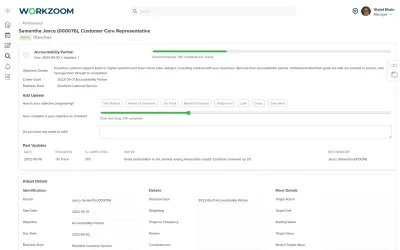
Workzoom demo performance objective showing its business goal, progress status, completion percentage, and past update

Two perspectives for the conversation

Use configured assessment questions to collect employee and manager input. Compare what each person recorded, then discuss the difference instead of treating a rating as the whole review.

A decision that stays deliberate

A manager can raise a compensation request during a performance review. Workzoom routes the request to an authorized approver; the rating itself does not change pay.

How it works

What happens between a goal and a review?

GOALS AND PROGRESS

Keep the objective and its updates together

A Workzoom objective can carry its business-goal link, due date and progress record. In the demo view, a dated update shows its status, completion percentage and note, so the number has context.
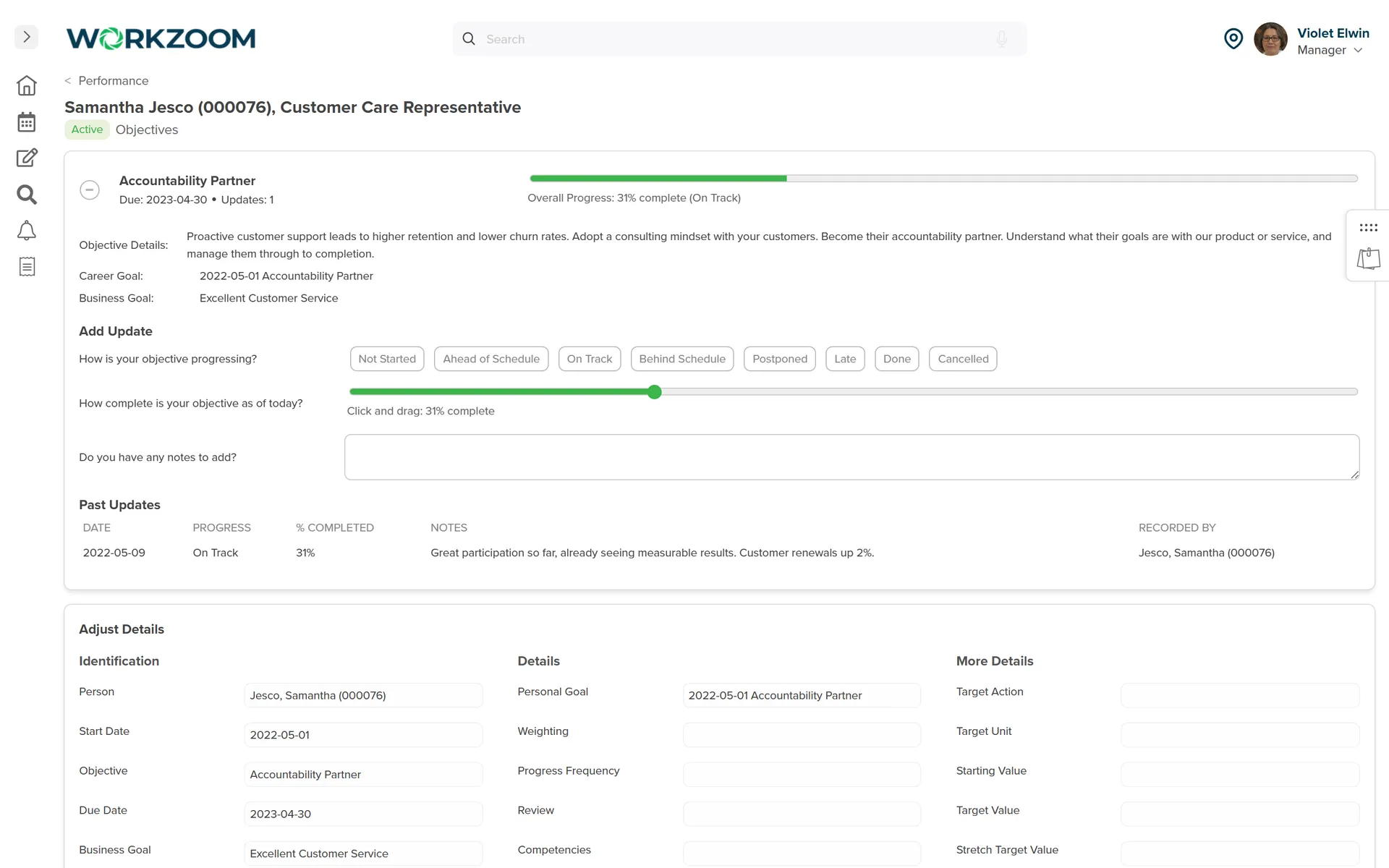
  • Connect an individual objective to a business goal
  • Record status, percentage and a substantive progress note
  • Return to the dated update when the review begins
Workzoom Performance demo objective with a linked business goal, progress status, completion percentage, notes field and dated past update.
View full-size screenshot
REVIEW CONVERSATION

Bring employee and manager perspectives into the review

Configure the review questions and timing for your team. Employee input, manager assessment and objective history give both sides a record to discuss; confirm the visibility and sign-off sequence in your walkthrough.
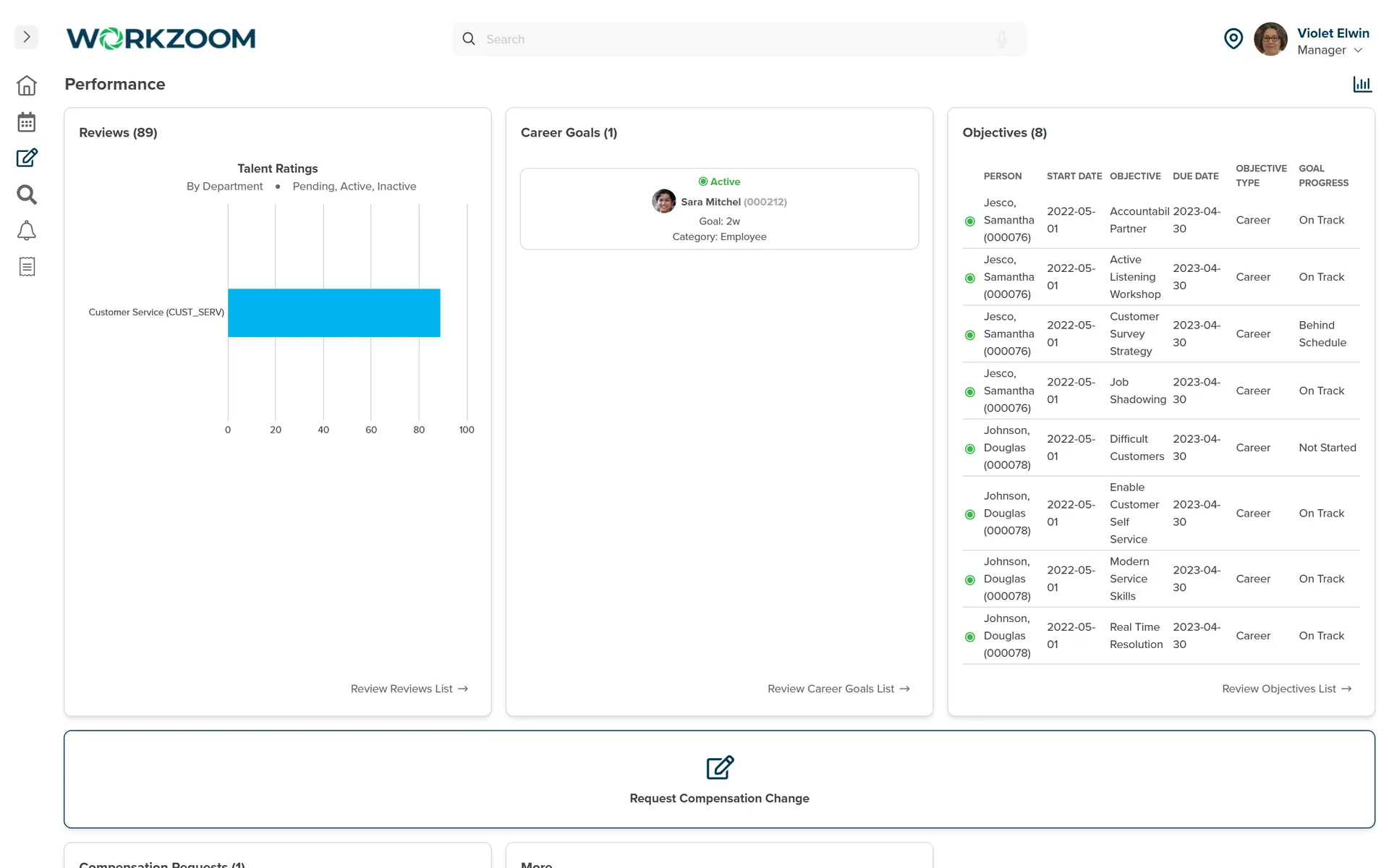
  • Use role-relevant questions and competency criteria
  • Review the objective record alongside each perspective
  • Check when responses become visible in your configuration
See performance review writing examples for Canada
Workzoom Performance demo manager view with reviews, one career goal and eight objectives showing progress statuses.
View full-size screenshot
OPTIONAL DEPTH AND NEXT STEPS

Add the assessment depth your process needs

Peer input, competency assessments and talent ratings can add context where they fit your process.

A review outcome stays available on the employee record, but it does not make a development or pay decision for you.

  • Use peer or competency input only when it fits the review
  • Reference ratings when considering development or succession
  • Submit and approve compensation changes as separate actions

Customer stories

Proof, not slideware.

See how employers use Workzoom across their people operations. Each story describes its deployed workflows. View all case studies


Hope Town lighthouse, Bahamas
Telecom 850 employees Bahamas
70% case study: faster payroll, 5 days to 1.5 days
Payroll runs seamlessly, and HR processes are no longer a tedious grind. It's simplified how we work, allowing us to focus more on our people.

Silvera for Seniors Residence West building
Senior Care 400 employees Canada
30 case study: buildings, 400 staff, one platform
Before Workzoom, we were buried in spreadsheets. Now HR is so much simpler. We spend less time on admin and more time supporting our staff and residents every single day.

Island Luck operations
Gaming 850 employees Bahamas
60+ case study: locations, 8 weekly payrolls, one record
What mattered most was choosing a solution built for businesses like ours. Workzoom delivered everything we needed, from payroll to facial recognition clocks, and worked with us every step.

Eagle's Nest lookout panorama, County of Renfrew
32 case study: hires onboarded in three months, zero paper
We would not be able to hire the way we do with the same resources. It has kept our headcount consistent without growing it, saving us time and money every single cycle.
Mid-Wilshire HCC residents
1month case study: implementation start to finish
Workzoom completely transformed our payroll process in just one month. So easy to audit, validate, and make corrections, even at the last minute. The support we received was incredible.
Atlantis Paradise Island, Bahamas
Telecom 850 employees Bahamas
70% case study: faster payroll, 5 days to 1.5 days
Moving to Workzoom was the right move. It gave our dynamic report and payment structures the flexibility we needed, at the right price.

Northern Sunrise County mountain river landscape
40% case study: faster payroll processing
Switching to Workzoom made managing payroll and timekeeping so much easier. We processed our first payroll faster than we expected and now feel far more confident in everything we do.

Workzoom is $4 USD per suite per employee per month, or $16 all-in for the full platform. No initial setup fees, no long-term contract. See pricing.

What teams ask before turning on Performance.

Workzoom performance management software keeps goals, progress updates and reviews on the employee record used across HR and Talent. The point is continuity: a manager can look at the objective and its notes before the review, then an administrator can reference the completed assessment when considering a separate development or compensation action. The software records context; it does not make those decisions.
A Workzoom objective can be linked to a business goal and given a due date. Its progress record shows a status, completion percentage, note and dated updates. That lets a manager discuss what work the percentage represents. If priorities change mid-cycle, ask how your team should revise and document the agreement. An update history is not the same as automatic versioning of every earlier goal.
Workzoom's demonstrated review workflow includes employee and manager assessment perspectives. Questions, competencies and the order in which people complete or see responses depend on configuration. In a walkthrough, ask to see the same review from both roles, when each response becomes visible, and how differences are brought into the conversation. Do not assume that every organization's review uses ratings or peer input.
Workzoom's objective view records progress status, percentage and notes. Progress reporting and automatic overdue emails are different capabilities. Ask to see which reminders and reports are available in your current configuration; do not assume an alert is sent because a goal is marked behind schedule.
Workzoom Performance includes peer input, competency assessments and talent-rating views, including 9-Box and 12-Box. They can add context where they fit your process; they need not be steps in every review. Ask to see the assessment type you plan to use and confirm its current configuration. A talent rating is not an automatic promotion or succession decision.
No. Performance and Career Planning use the same employee record, so an administrator can reference a review or competency assessment. The development plan is created and maintained separately. In a walkthrough, ask who owns the follow-up and how the plan is recorded.
No. A manager or administrator can refer to the completed review when making a compensation request because both sit on the employee record. The request follows its own submission and approval steps; a rating does not change salary or issue a bonus. Ask to see the approval path and the effective-date handling that apply to your organization before relying on that connection.

Get started

See Performance on your own data.

Get a straight answer on fit and price. For organizations with 50 or more employees. See our minimums.


Loading available times.

Better work, in your inbox.

Fresh ideas for HR and payroll. Every week.

Better work, in your inbox.

Practical ideas for HR, payroll and workforce teams.