 Canada
 United States
 Bahamas
 Jamaica
 Trinidad & Tobago
 Antigua & Barbuda
 Barbados
 Anguilla
Workforce / Timekeeping
Clocking in systems: four ways to clock in, one pay run.
From free geofenced mobile clocking to enterprise biometric terminals. Compare methods, pricing, and features to find the right solution for your workforce.
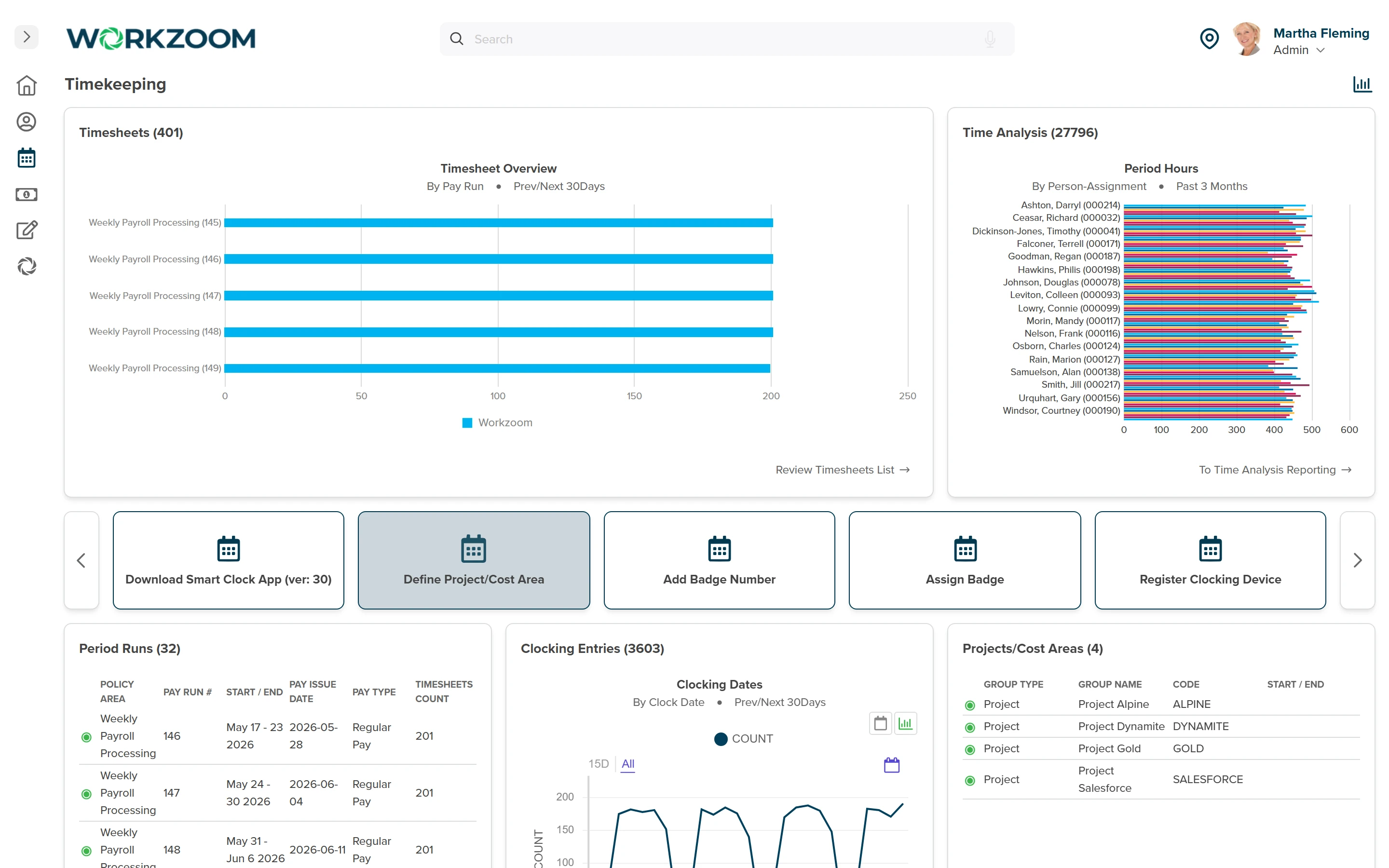
to set up mobile and kiosk clocking, no hardware
recurring software fees for clocking, on any method
optical fingerprint scanner accuracy on the TPS450 terminal
GPS punch accuracy in most urban areas
Included free
Four time clocking methods, in every plan.
No hardware, no recurring fees. Start clocking immediately.
All software clocking methods are included in every Workzoom Workforce plan. No add-ons, no recurring software fees. See the full timekeeping features.
What it costs
Software is free. Hardware is a one-time purchase.
Software clocking is free in every Workforce plan. Add biometric terminals as a one-time purchase, no recurring fee. Estimate your cost below.
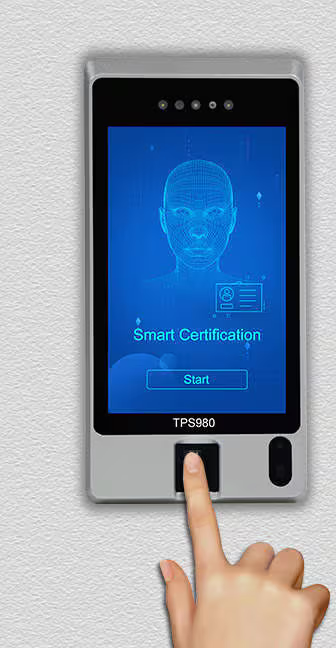 Fingerprint terminal (TPS450)
$1,195 USD each$1,495 CAD each
Fingerprint terminal (TPS450)
$1,195 USD each$1,495 CAD each
- Optical fingerprint scanner (99.8% accuracy)
- Proximity card reader (ISO14443 A/B)
- IP65 weather-rated (-10°C to 50°C)
- Ethernet or WiFi with offline mode
- 1-year full warranty included
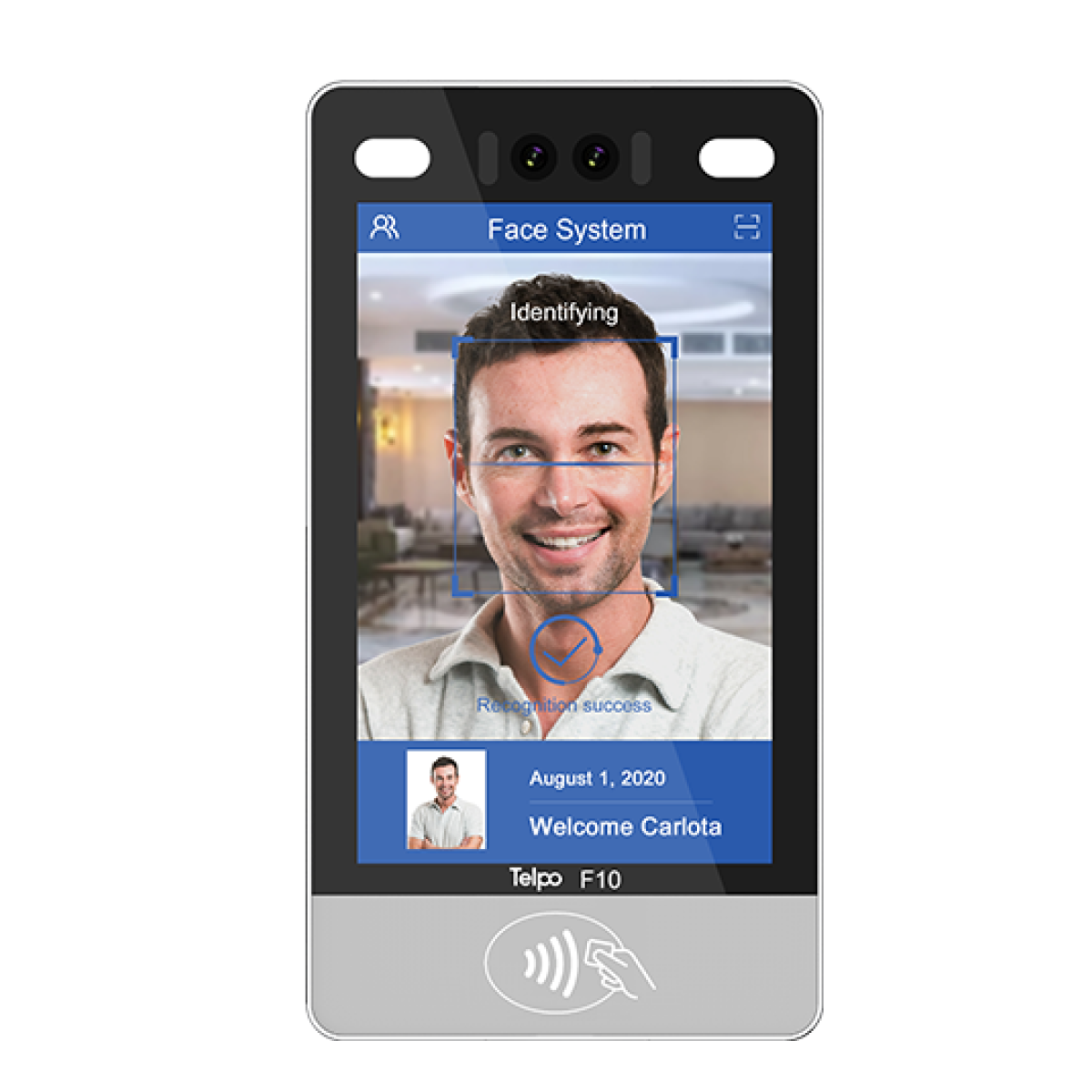 Facial recognition terminal (F10T)
$1,495 USD each$1,995 CAD each
Facial recognition terminal (F10T)
$1,495 USD each$1,995 CAD each
- AI facial recognition with mask support (99.5% accuracy)
- 10" touchscreen display (800x1280)
- NFC card reader and manual keypad
- 1-year full warranty included
One terminal covers one entry point. One-time purchase, no recurring fee, ships within North America with a 1-year warranty. See full pricing or timekeeping features.
Workzoom time clock hardware pricing
Workzoom includes four software-based time clocking methods at no cost in every Workforce plan: a mobile app with GPS, kiosk mode, manual timesheet entry, and web clock-in. There are no recurring software fees for clocking. Optional biometric hardware terminals are a one-time purchase. The TPS450 fingerprint terminal costs $1,195 USD or $1,495 CAD. The F10T facial recognition terminal costs $1,495 USD or $1,995 CAD. Each terminal covers one entry point or clocking station. Hardware prices include shipping within North America and a 1-year full warranty. There is no recurring fee for the hardware.
Why teams choose biometric
Eliminate time theft, reduce admin, ensure compliance.
SHRM research shows time theft is common in manufacturing, warehouses, and unionized environments. Biometric verification closes the gap.
Which method fits?
Choose based on your environment.
Most customers run more than one. Many start with mobile clocking and add biometric terminals at office entry points later.
The methods explained
A buyer's guide to employee time clocking methods.
Every clocking method trades accuracy, cost, and fraud resistance against the kind of work your people do. Here is how Workzoom's four core methods compare, written for the buyer, not the brochure.
There is no single best way to clock in. A field crew that moves between job sites has nothing in common with a hospital ward or a retail floor. The right choice depends on where work happens, how much you can spend up front, how exposed you are to buddy punching, and what your payroll team needs to trust at the end of the week. Read each method on its own terms, then use the matrix below to narrow the field.
Also in the marketPIN, badge, and browser punch
You will also see PIN-code keypads and RFID badge swipes at other vendors. Workzoom does not sell dedicated hardware for either, since a shared kiosk with a stronger credential covers the same ground without the extra terminal. Workzoom also includes a free web browser clock-in for salaried and office staff who already work from a company computer, alongside the four core methods below.
Method oneBiometric fingerprint
How it works: a sensor reads the ridge pattern of a finger and matches it to a stored template. Nothing to carry and nothing to remember, because the credential is the person.
Accuracy and cost: modern optical and capacitive scanners are highly accurate in normal conditions. Up-front cost is higher than a keypad or card reader because each terminal carries a sensor, and you should budget for the enrollment time it takes to register every employee.
Buddy-punch resistance and best fit: strong, because a fingerprint cannot be passed to a coworker the way a card or code can. The trade-offs are practical: worn, wet, dirty, or gloved fingers can fail to read, which matters in trades and food handling, and some employees and unions raise privacy concerns about storing biometric data. Where local law regulates biometric collection, confirm your consent and retention obligations before rollout. Fingerprint terminals fit fixed entry points in warehouses, plants, and secure facilities where eliminating buddy punching justifies the hardware.
Method twoFacial recognition
How it works: a camera-based terminal maps facial geometry and matches it against an enrolled template, usually in under a second and without contact.
Accuracy and cost: accuracy is high in controlled lighting, and contactless reads moved many buyers toward it during periods when shared-touch surfaces were a concern. It is typically the most expensive method per terminal because of the camera and processing hardware, and performance can dip in harsh outdoor light or when faces are heavily covered.
Buddy-punch resistance and best fit: among the strongest, since presenting a face is hard to fake at a well-configured terminal, and contactless reading keeps lines moving. The same privacy and consent considerations that apply to fingerprints apply here, often more sharply, so check your jurisdiction's rules on facial data. It fits high-traffic, high-security entrances and environments where contactless verification is a priority, such as healthcare and large multi-shift sites.
Method threeKiosk and tablet
How it works: a shared tablet or terminal at a fixed spot lets workers punch in turn, usually with a PIN, a card tap, or a face or fingerprint check layered on top. One device serves a whole crew.
Accuracy and cost: timestamps are precise, and because one kiosk covers many employees, the per-person hardware cost is low compared with issuing a device or sensor to everyone. A tablet you already own can become a kiosk with the right app.
Buddy-punch resistance and best fit: it depends entirely on the credential you put in front of it. A PIN-only kiosk is as weak as PIN entry, while a kiosk gated by a face or fingerprint check inherits that method's strength. Kiosks fit retail floors, restaurants, hospitality, and any single-entrance workplace where a shared station at the door is the most practical way to capture a shift-based crew.
Method fourMobile app with GPS
How it works: the employee clocks in from a smartphone app, and the device's location is captured at the moment of the punch. With geofencing layered on, the app can confirm the worker is inside a defined zone before it accepts the punch.
Accuracy and cost: the time is precise and the location is accurate to within roughly tens of feet in open areas, though signal can drift indoors, in dense cities, or underground. Hardware cost is effectively zero when employees use their own phones, which is why it is the lowest-cost way to cover a dispersed workforce.
Buddy-punch resistance and best fit: moderate. Location proves where the phone is, not who is holding it, so it raises the bar without closing the gap entirely. Adding a photo capture or a face check at punch tightens identity. It is the natural fit for field service, construction, home care, delivery, and any team that does not pass through a single door, since it puts the clock wherever the work is.
The modifierGeofencing as a layer, not a method
Geofencing is not a standalone way to clock in. It is a rule you wrap around mobile punching that draws a virtual boundary around a worksite and only accepts a punch from inside it. On its own it tells you a device crossed a line, not who carried it, so its real value is as a guardrail on top of an existing method rather than a substitute for identity. Used well, it turns a soft mobile punch into a location-verified one and gives payroll a defensible record that the worker was on site when they clocked in.
Geofencing depends on a defined work address, so it is not available everywhere yet. In the Bahamas and other countries without a standardized postal or address system, employees clock in through the mobile app without the geofence check, or use kiosk or biometric terminals instead.
| Method | Accuracy | Buddy-punch resistance | Setup cost | Best for |
|---|---|---|---|---|
| Biometric fingerprint | High | Strong | Higher | Fixed entry points, warehouses, secure facilities |
| Facial recognition | High in good lighting | Strong | Highest | High-traffic, high-security, contactless entrances |
| Kiosk / tablet | High; identity depends on credential | Depends on credential | Low per person | Retail, restaurants, hospitality, single-entrance crews |
| Mobile app with GPS | High timestamp, location to tens of feet | Moderate | Low (uses own phones) | Field, construction, home care, delivery, distributed teams |
Buddy-punch resistance describes how easily one worker can clock in for another, not the precision of the timestamp itself. Most organizations run more than one method: a strong verified method at fixed entrances, and a low-cost mobile or browser option for people who work away from a door.
Order hardware
Order your biometric terminals.
For existing Workzoom clients. Open the order form and our implementation team will confirm pricing, shipping, and install. Not a client yet? Book a call to learn more first.
Clock order form
Contact info, client verification, and terminal quantities. Takes about two minutes.
Questions about which terminal fits, quantities, or implementation? Email us or book a call.
Order your biometric terminals
For existing Workzoom clients. Our implementation team confirms pricing, shipping, and install. Not a client yet? Book a call first.
Loading the order form…
The order form could not load here. Email us the terminal model and quantities instead, and our implementation team will take it from there.
Email your orderPrefer email? info@workzoom.com with the terminal model and quantities.
FAQ
Frequently asked questions.
Answers about time clocking methods, implementation, and pricing.
Workzoom offers four included time clocking methods at no cost, plus optional biometric hardware for higher-security environments.
Included methods: mobile app with GPS location-based clock-in (iOS and Android), web browser clock-in from any computer, kiosk mode for shared devices (iPad, laptop, desktop), and manual timesheet entry with manager approval (full hours, project hours, overtime-only logging, or a fixed schedule).
Optional hardware: fingerprint terminals ($1,195 USD or $1,495 CAD each) and facial recognition terminals ($1,495 USD or $1,995 CAD each).
Choose based on your workforce needs. Remote teams typically use mobile clocking. Manufacturing and high-security environments benefit from biometric terminals for OSHA-compliant time tracking.
GPS geo-fencing: employees clock in automatically when they arrive at a designated location using their phone. Ideal for field teams, delivery drivers, and remote workers. No hardware required.
Biometric clocking: employees scan their fingerprint or face at a physical terminal. Prevents buddy punching and time theft. Best for offices, manufacturing, healthcare, and high-security industries.
In practice, many organizations use both: GPS for mobile teams and biometric terminals at office entry points.
It depends on your workforce and industry. Remote and field teams: mobile app with GPS. Office-based: kiosk mode or manual entry. Manufacturing and warehouse: biometric terminals to prevent time theft and buddy punching. Healthcare: biometric terminals for compliance. Multi-location: a mix of methods, biometric at the main office and mobile for field staff.
You can use multiple methods for different departments. Most customers start with mobile clocking and add biometric terminals later. Learn more about Workzoom timekeeping features.
Yes. The Workzoom mobile app (iOS and Android) allows employees to clock in and out from anywhere. Features include automatic clock-in when entering a designated location (GPS), manual clock-in if GPS is unavailable, photo timestamp for verification, and offline support that syncs when the connection returns.
No setup required. Employees download the app and can start clocking in immediately.
Biometric clocking verifies identity using unique physical characteristics. This prevents buddy punching (only your fingerprint or face can clock you in), shared credentials (you cannot share a PIN, keycard, or password), and time manipulation (it creates tamper-proof attendance records).
According to SHRM research, time theft is common in manufacturing, warehouses, and unionized environments. Explore Workzoom's time theft prevention features.
Yes. All four included clocking methods are free: mobile app with GPS, web browser clock-in, kiosk mode, and manual timesheet entry. Optional biometric terminals start at $1,195 USD ($1,495 CAD). There are no recurring software fees, the hardware is a one-time purchase. Compare pricing and features on the Workzoom pricing page.
GPS geo-fencing is accurate within 10 to 30 feet in most urban areas. You define the geo-fence radius (typically 100 to 500 feet) around your work location. Employees can manually clock in if the GPS signal is temporarily lost, for example in buildings or tunnels.
Geofencing depends on a defined work address, so it is not available everywhere yet. In the Bahamas and other countries without a standardized postal or address system, employees clock in through the mobile app without the geofence check, or use kiosk or biometric terminals instead.
For high-accuracy requirements, combine mobile clocking with biometric terminals at entry points. Our biometric systems follow the ISO/IEC 19794 biometric data standard.
Mobile and kiosk clocking: set up in minutes. Employees download the app or bookmark the kiosk page and start clocking in immediately.
Biometric terminals: physical installation is required, typically 1 to 2 hours per location, and our team supports the setup. Most customers experience zero downtime during implementation, as existing time tracking continues while new systems are configured.
All methods comply with FLSA timekeeping requirements. Once you select your methods or purchase terminals, our implementation team sends a detailed setup guide with timelines and support contacts.
No. Biometric hardware is optional. Many organizations run entirely on free mobile and kiosk clocking. Consider biometric terminals if you need to prevent time theft in high-turnover roles, meet compliance requirements (healthcare, finance), eliminate buddy punching in manufacturing or warehouses, or maximize security in sensitive environments.
You can start with mobile clocking and add biometric terminals later. They feed into the same timesheet pipeline.
Included in your Workzoom subscription: mobile app, web clock-in, kiosk mode, and manual timesheet entry, all $0. Optional one-time hardware cost: fingerprint terminal $1,195 USD ($1,495 CAD), facial recognition terminal $1,495 USD ($1,995 CAD).
Example scenarios: a 100-person team using mobile clocking is $0; an office with one biometric terminal is $1,195 USD ($1,495 CAD); a multi-site setup with two biometric terminals plus mobile for field teams is $2,390 USD ($2,990 CAD). Most organizations see ROI within 3 to 6 months through reduced time theft, faster payroll, and better labor costing. View detailed pricing.
Get started
Built around your org. See it run live.
A 15 to 60 minute working session, not a slide deck. We look at your org, map the right suites, and show you what to expect on pricing. If we're not a fit, we'll say so.
Workzoom works with organizations of 50 or more employees. See our minimums.