
HR Suite · Organization

Org chart software that automates everything downstream

Job profiles, departments, work sites, positions, and management hierarchies. The backbone data that drives automation across recruiting, payroll, scheduling, and every other module.

See org chart software in 15 minutes with a working session shaped to your org.

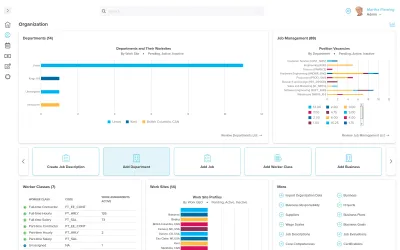
Workzoom organization dashboard showing departments by worksite, job position vacancies by department, worker classes, and multi-country work sites including Canada, the United States, and the Bahamas, org chart software in Workzoom

AThe short answer

Workzoom org chart software, also called position management software, defines job profiles, departments, work sites, positions, and reporting hierarchies inside the HRIS. It turns that organizational chart into automation: it drives recruiting requisitions, payroll cost centres, scheduling assignments, and approval routing across every module. Because position management and the org chart software are part of the HRIS rather than a separate data visualization tool, the chart is always live, headcount is tied to real positions, and a reorganization updates every connected workflow, supporting succession planning and workforce planning at once. Workzoom organization software fits employers with 50 to 5,000 employees.

Live on Workzoom right now. North America and the Caribbean.

The real problem

Where org structure breaks down today

03 pain points

Approval routing, cost centers, and reporting lines are configured separately in each tool. A reorg means updating the same change in five places, and they drift apart immediately.

The Workzoom answer

Workzoom Organization defines departments, positions, and reporting lines once. A single change propagates automatically to approvals, payroll cost centers, scheduling, and reviews.

HR Suite

Define the structure once and everything downstream follows.

Every Workzoom suite runs on one employee record, so organization stays current with payroll, HR, workforce, and talent without an export or an integration to maintain.

Benefits

Why Organization?

One Structure That Runs Everything

Departments, positions, and reporting lines defined once in Organization drive approval routing, payroll cost centers, scheduling, and performance reviews across every module. A single change here propagates automatically so nothing falls out of sync.

Visible Vacancies and Accurate Headcount

Position management keeps roles visible in the org chart even when no one is filling them. FTE limits, cost center mappings, and career paths stay intact so headcount planning and recruiting happen from real data, not spreadsheet estimates.

Safety Tracking Without a Separate Tool

Workplace safety incidents, injuries, and WCB tracking live in the same system as your org structure and employee records. Incident patterns analyze by department and location automatically because the data is already connected.

How it works

How org chart software runs in production.

01 ORGANIZATIONAL STRUCTURE

Define departments, positions, and reporting lines once

Workzoom lets you define your organizational structure once and every connected module builds from it. Approval routing, payroll cost centers, scheduling assignments, and performance review chains all reference the same hierarchy automatically.
  • Interactive org charts filterable by department, location, and division
  • Multi-entity support for separate businesses as distinct legal entities
  • Date-effective structural changes preserved over time for audit and compliance
  • Real-time updates when reporting lines, transfers, or restructures occur
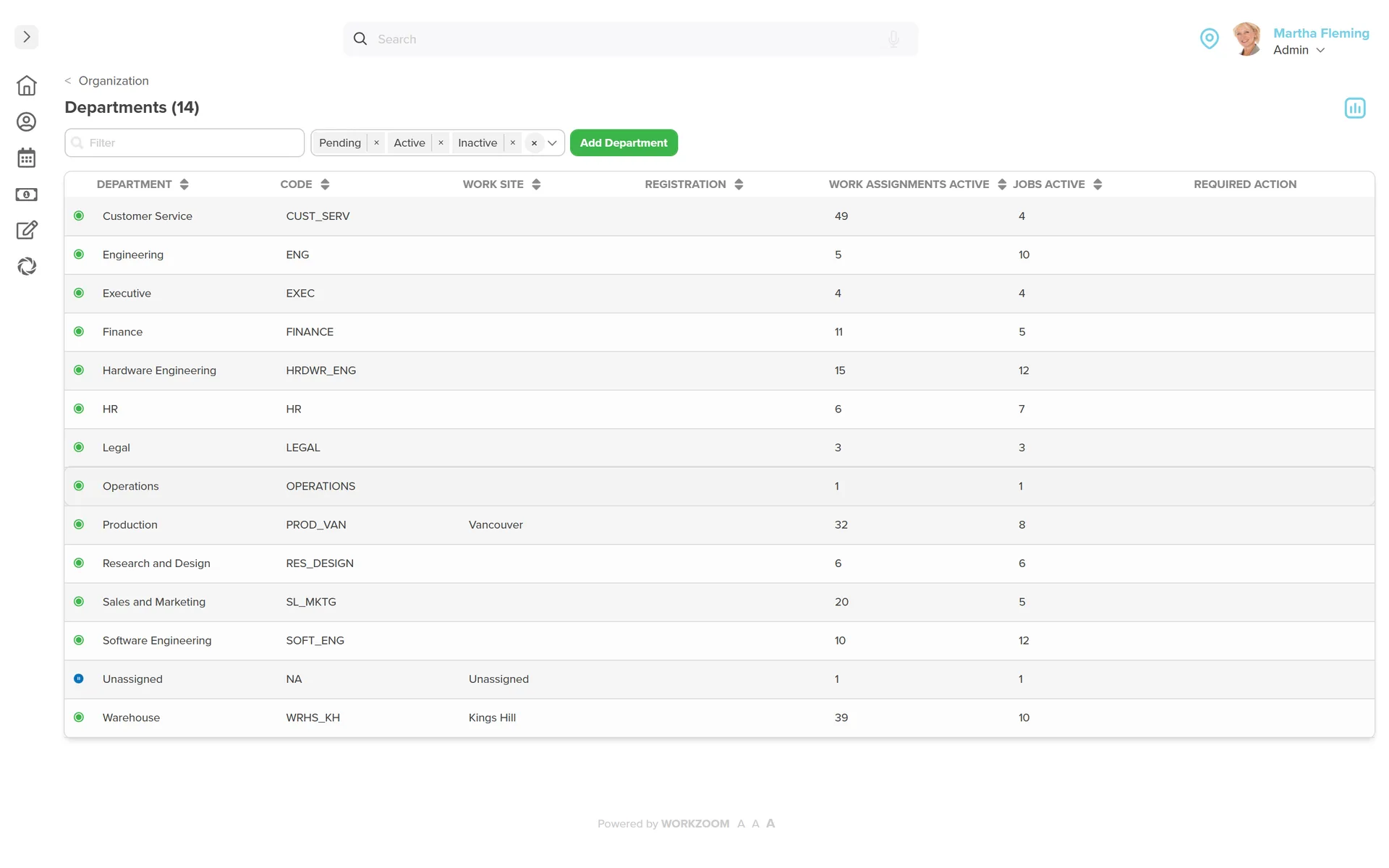
Workzoom Organization departments list: 14 departments including Customer Service, Engineering, Executive, Finance, HR, Legal, Operations, Production, and Sales and Marketing, each with its code, work site, active work assignments, and active jobs.
02 POSITION MANAGEMENT

Track vacant roles, not just the people filling them

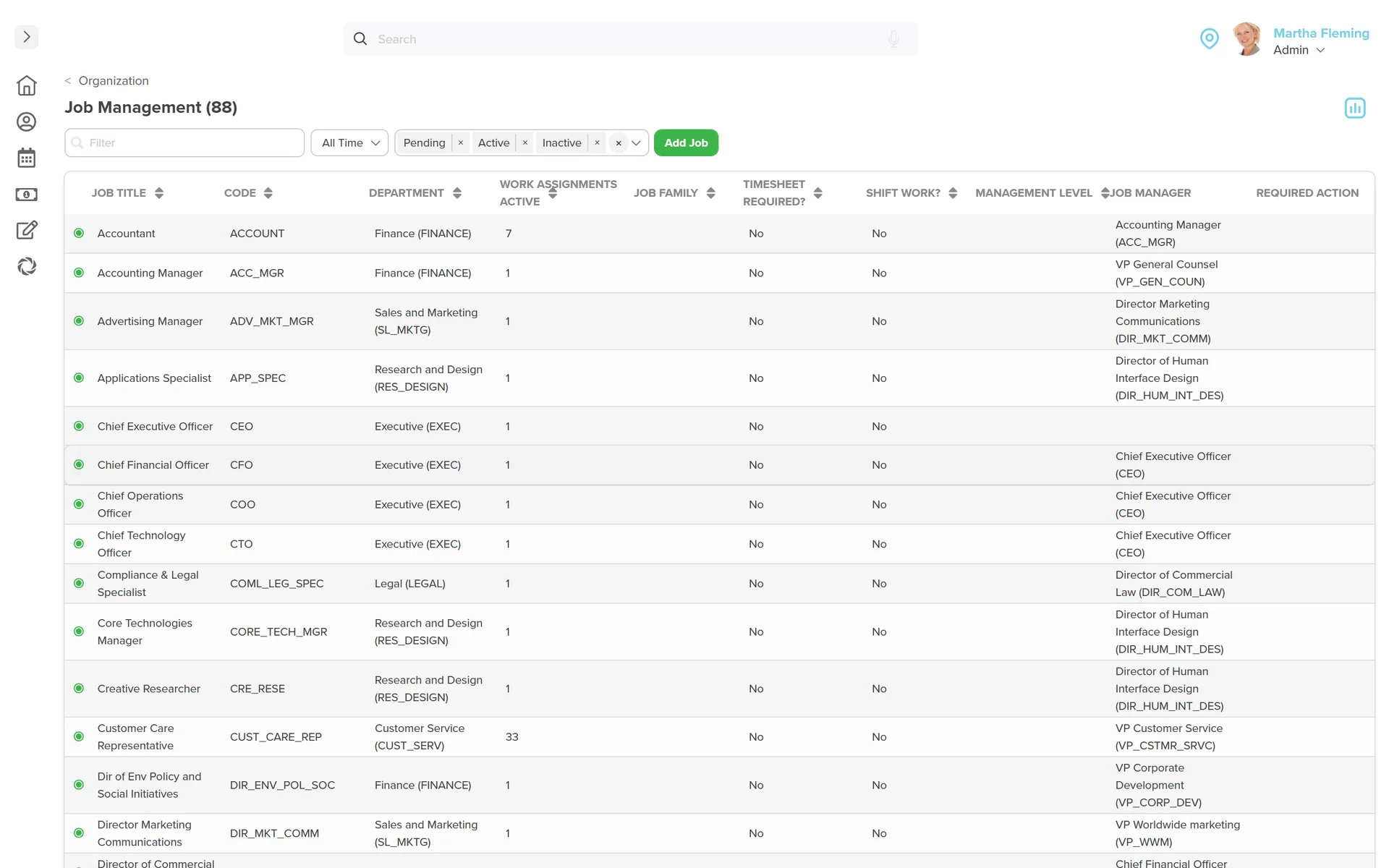
Workzoom tracks positions independent of people so that when someone leaves, the role stays visible in the org chart with its FTE limits, cost center mapping, and career path intact. Recruiting creates requisitions directly from open positions.
  • Vacancy tracking with authorized FTE limits and funding type per position
  • Cost center mapping for payroll journal entries at the position level
  • Career path definitions, certifications, and competency requirements per job
  • Headcount planning happens in the system, not a separate spreadsheet
Workzoom Organization job management list: 88 positions with job title, code, department, active work assignments, job family, management level, and the reporting job manager for each, from Accountant to executive roles.
03 APPROVAL ROUTING

Approval workflows route automatically based on org structure

Workzoom routes time-off requests, expense approvals, and requisitions based on the reporting lines defined in Organization. When someone transfers or a manager changes, every approval workflow updates automatically without any manual reconfiguration.

  • Time off and expense approvals route based on live reporting lines
  • Requisitions route to the correct department and cost center automatically
  • Manager changes propagate to all connected approval workflows immediately
  • No manual re-routing when organizational changes occur
04 SAFETY TRACKING

Record incidents and track injuries inside your org structure

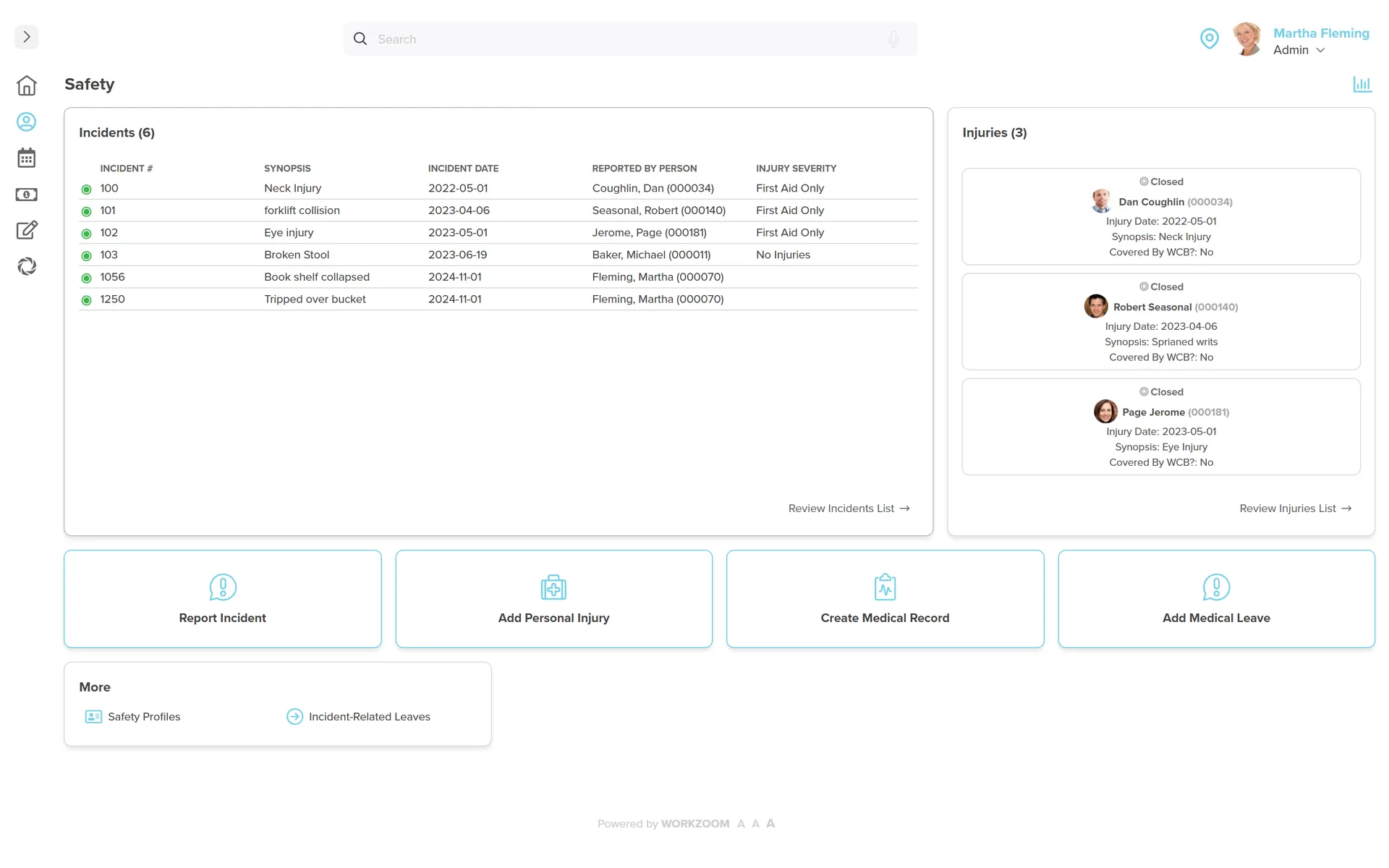
Workzoom includes workplace safety incident tracking connected directly to your org structure. Record incidents with full context, track injuries with WCB coverage status, and manage safety committee membership, all without a separate EHS tool.
  • Workplace safety incident reporting with severity, witnesses, and full context
  • Injury tracking with WCB coverage status, medical records, and incident leaves
  • Safety committee membership tracking and training via the Learning module
  • Analyze incident patterns by department and location using org structure data
Workzoom Safety dashboard: six logged incidents with date, synopsis, reporter, and injury severity beside three tracked injuries with workers compensation status, plus quick actions to report an incident, add a personal injury, create a medical record, or add a medical leave.
05 MULTI-ENTITY SUPPORT

Manage multiple companies from one organizational system

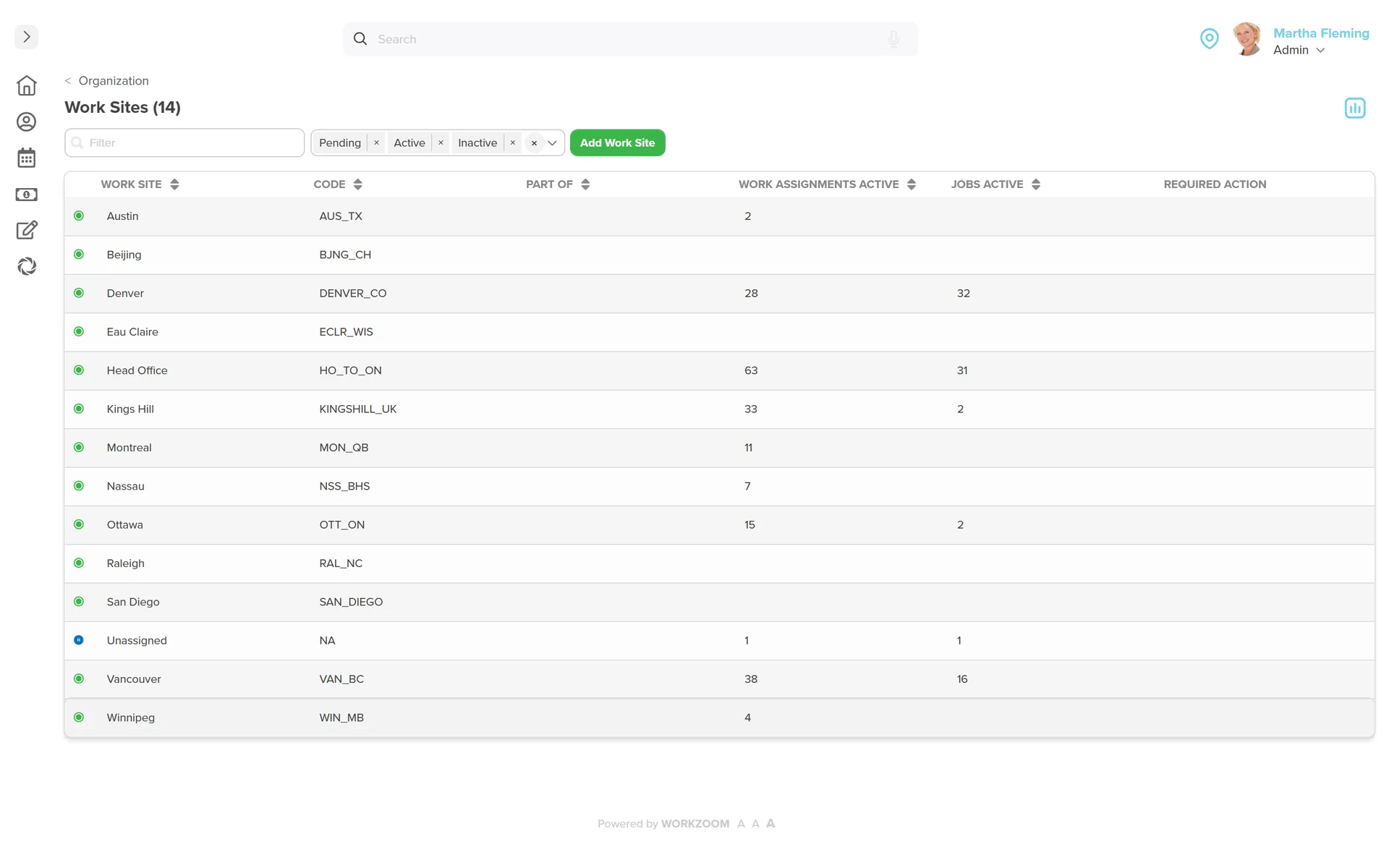
Workzoom supports separate businesses as distinct legal entities within a single platform, each with its own hierarchy, departments, work locations, and policies. DCAG uses this to manage multiple dealerships where each location maintains its own structure while leadership sees the full picture.
  • Separate entities with independent hierarchies, policies, and compliance rules
  • Consolidated reporting across all entities for leadership visibility
  • Data access privileges keep each entity's information separate
  • Location-specific compliance, holiday calendars, and job management built in
Workzoom Organization work sites list: 14 work sites across Canada, the United States, the United Kingdom, and the Bahamas, including Vancouver, Montreal, Ottawa, Winnipeg, Denver, Austin, San Diego, Kings Hill, and Nassau, each with its code and active job and assignment counts.

06Customer stories

Proof, not slideware.

Teams running Workzoom organization on real payroll, real schedules, real headcount. View all case studies

Hope Town lighthouse, Bahamas
Telecom 850 employees Bahamas
70% case study: faster payroll, 5 days to 1.5
Payroll runs cleanly, and HR is no longer a tedious grind. It simplified how we work, letting us focus more on our people. A real shift for our entire team.
Silvera for Seniors Residence West building
Senior Care 400 employees Canada
30 case study: buildings, 400 staff, one platform
Before Workzoom, we were buried in spreadsheets. Now HR is so much simpler. We spend less time on admin and more time supporting our staff and residents every single day.

Island Luck operations
Gaming 850 employees Bahamas
60+ case study: locations, 8 weekly payrolls, one record
What mattered most was choosing a solution built for businesses like ours. Workzoom delivered everything we needed, from payroll to facial recognition clocks, and worked with us every step.

Eagle's Nest lookout panorama, County of Renfrew
32 case study: hires onboarded in three months, zero paper
We would not be able to hire the way we do with the same resources. It has kept our headcount consistent without growing it, saving us time and money every single cycle.
Mid-Wilshire HCC residents
1month case study: implementation start to finish
Workzoom completely transformed our payroll process in just one month. So easy to audit, validate, and make corrections, even at the last minute. The support we received was incredible.
Atlantis Paradise Island, Bahamas
Telecom 850 employees Bahamas
70% case study: faster payroll, 5 days to 1.5
Moving to Workzoom was the right move. It gave our dynamic report and payment structures the flexibility we needed, at the right price.

Northern Sunrise County mountain river landscape
40% case study: faster payroll processing
Switching to Workzoom made managing payroll and timekeeping so much easier. We processed our first payroll faster than we expected and now feel far more confident in everything we do.

Workzoom is $4 USD per suite per employee per month, or $16 all-in for the full platform. No setup fees, no long-term contract. See pricing.

08Frequently asked

What teams ask before turning on Organization.

Specifics on how Workzoom organization works, what it costs, and how it connects to the rest of the platform.


Workzoom's organizational structure is the control layer that approval routing, payroll cost centers, scheduling assignments, and performance review chains all build from. Change a reporting line or transfer an employee, and every connected module updates automatically. It is not a display layer. It runs the entire platform.
Workzoom's position management tracks roles independent of the people filling them. When someone leaves, the role stays visible with its FTE requirements, cost center mapping, and career paths intact. This is how you track vacancies, plan headcount, and create recruiting requisitions directly from the org structure instead of maintaining a separate spreadsheet.
Workzoom maps departments and positions to cost centers and funding types. When payroll runs, journal entries split correctly by department, location, and business unit based on this mapping. Transfer an employee between departments and the payroll allocation updates automatically in the next pay run with no manual reconciliation.
Workzoom manages both jobs and positions. A job is a role definition that includes title, responsibilities, certification requirements, and career path connections. A position is a specific seat in the org structure that references a job. One job can have many positions. For example, the job Registered Nurse might have 15 positions across 3 locations. This enables vacancy tracking and position-based succession planning.
Workzoom renders interactive org charts in real time by department, position, or person. When a reporting line changes, someone transfers, or a new hire fills a vacancy, the chart reflects the change immediately. Every structural change is date-effective, so the system preserves what the organization looked like at any previous point. Island Luck uses real-time org charts to maintain visibility across 60+ locations.
Workzoom includes safety incident tracking as part of the same system that manages your org structure, employee records, and payroll. You record incidents with full context, track injuries with severity and WCB status, manage medical leaves, and maintain safety committee membership. Safety training is delivered through the built-in Learning module. Because safety data lives alongside organizational data, you can analyze incident patterns by department and location without a separate EHS tool.
Workzoom uses the structure defined in Organization to determine which compliance rules, policies, and training requirements apply to each employee. Safety certifications and compliance training are assigned based on role and location through the Learning module. The County of Renfrew used this to ensure safety training was completed before new hires set foot on site.
Get started

See Organization in action.

Book a 30-minute walkthrough. No sales pressure, just the live product on your own data.

Live product, configured to your industry and headcount Straight answers on pricing, timing, and fit No setup fees, no lock-in, no pressure

10Workzoom newsletter

Subscribe to People Practices That Work.

Product walkthroughs, HR playbooks, Caribbean compliance updates, and the occasional war story from the field. Weekly. Two minutes.