 Canada
 United States
 Bahamas
 Jamaica
 Trinidad & Tobago
 Antigua & Barbuda
 Barbados
 Anguilla
Does Employee Scheduling Software Survive a 6 A.M. Callout?

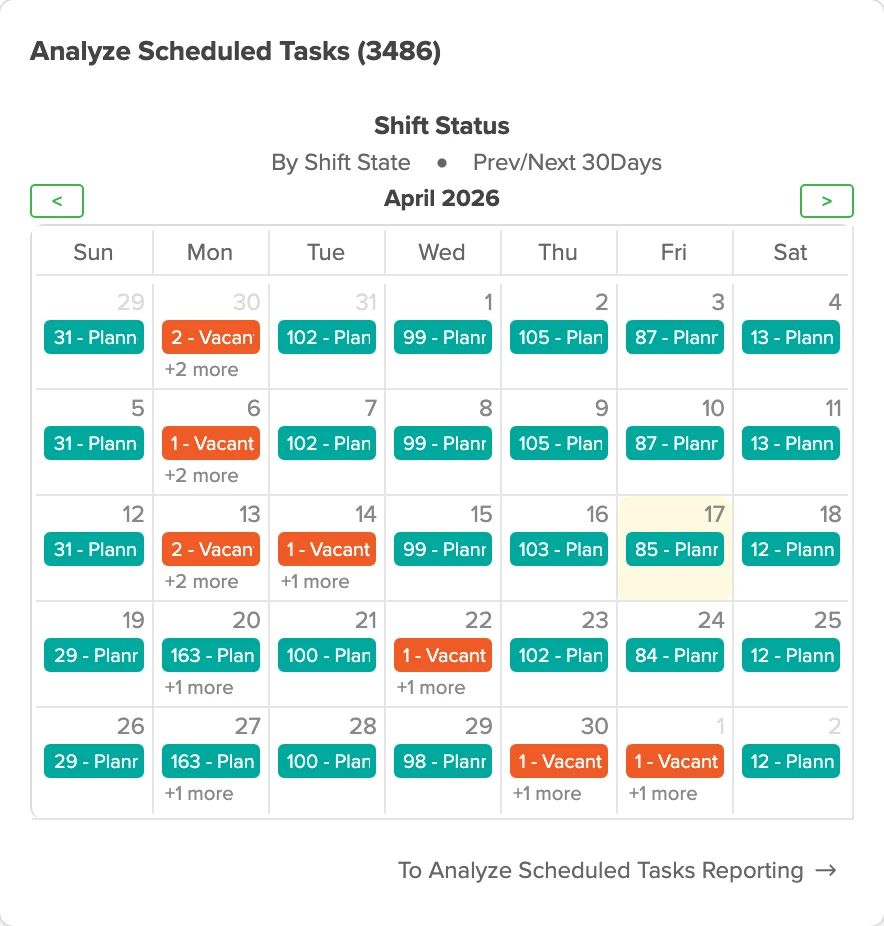
It's 6:02 a.m. and the overnight shift is one person short. The scheduler is scrolling a phone contact list built from memory, calling down a roster to find someone who's qualified, available, and close enough to make the start time. Scheduling software that can't find that person and calculate the overtime correctly at six a.m. isn't workforce software. It's a calendar.
Employee scheduling software for multiple locations only fixes that callout if it does three things without a human relay: match the vacancy to a qualified employee, calculate the correct shift premium and overtime before the shift starts, and push an accept-or-decline straight to that employee's phone. Most tools built for shift work handle one of the three. Almost none handle all three without someone stopping to check a spreadsheet in between.
You're not failing at this. The phone tree and the spreadsheet are.
- Ontario's three-hour rule has eligibility conditions and exceptions. Check the employee's usual hours, attendance and availability to work.
- Federal employees get a 3-hour reporting pay minimum under the Canada Labour Standards Regulations.
- BC minimum daily pay is generally two hours, or four if the employee was scheduled for more than eight hours, subject to exceptions. Public-service call-out provisions are separate.
- Configure contractual shift premiums separately from statutory overtime and reporting-pay obligations.
- A calendar can show who's scheduled. Only a policy engine can calculate what the replacement is owed.
The 6 A.M. Callout Test
At a shift-based, multi-site employer, that phone call has maybe two hours before the shift starts. Long-term care, community living, public works: the schedule doesn't wait for someone to find a replacement. It runs short. Or it runs with someone unqualified for the unit. Or it runs into overtime nobody priced correctly until payroll, two weeks later.
Your scheduler knows the roster by heart. That was never the problem. The problem: finding a qualified, available person and pricing the shift correctly are two separate jobs. Two different people, two different times. Neither talks to the other until the pay run.
What Breaks When One Person Calls In Sick
Crystal Murray, HR Generalist at Silvera for Seniors, ran into the mechanical version of this before switching systems. "10-15% of our staff would have issues [with punch clocks] and would have to enter manually," she says. Multiply that across 36 buildings and the spreadsheet becomes the record of truth. The schedule stops being the schedule.
We see this pattern at every shift-based, multi-site employer we talk to. The vacancy gets tracked in one place. The premium gets calculated somewhere else, usually by hand. The leave request that started the whole chain lives in a third system entirely. Nothing here is a training gap. It's three disconnected records pretending to be one process.
Can Employee Scheduling Software for Multiple Locations Handle This?
Most can't, not fully. Four things separate a real fix from a nicer calendar:
- Credential-blocked scheduling. Only qualified people appear on the fill list. A nurse fills a nurse shift, a PSW fills a PSW shift, automatically, with no manager cross-checking a binder.
- Cross-site visibility. One dashboard covers every location. No separate login per building, no separate spreadsheet per site.
- Mobile accept. The replacement gets a text, accepts from their phone, and is on the schedule in minutes. No work email required, which matters when half your workforce doesn't have one. It also logs the accept against a real device, which cuts against buddy punching risk too.
- A policy engine, not a lookup table. Shift premiums and overtime rules apply automatically the moment the shift is filled, the same way every time, tied to the role and the site rather than a manager's memory of last month's exception.
Tyler Sands, HR Specialist at Island Luck, put it simply after the switch: "What mattered most was choosing a solution built for businesses like ours." That's the bar. Built for shift work. Not retrofitted from a calendar app.
Shift Premiums and Overtime: Where Generic Tools Fail
Overtime thresholds, rate bases and reporting-pay rules vary by jurisdiction and worker category. Collective agreements and employer policies can add shift premiums. Configure each applicable rule so a filled shift produces the correct pay calculation.
Ontario's three-hour rule applies to qualifying employees who regularly work more than three hours a day, report as required and remain available but work less than three hours, with statutory exceptions. Federal schedule-notice rules have exceptions and may interact with collective agreements. BC's minimum daily pay differs from the BC public-service call-out policy. Check the actual employment standard and agreement rather than copying a public-service rule across private employers.
| Capability | Generic calendar or spreadsheet | Policy engine (Workzoom) |
|---|---|---|
| Finds a qualified replacement | Manual phone list | Automatic qualified fill list |
| Shift premium calculation | Applied by hand after the fact | Applied automatically at fill time |
| Overtime and unscheduled-day rules | Caught during payroll, if at all | Calculated before the shift starts |
| Mobile accept | Unofficial text message | Built-in accept or decline, logged |
| Cross-site visibility | One spreadsheet per site | One dashboard, every site |
Six Questions to Ask Before You Buy
- Does it block unqualified employees from the fill list automatically, or does a manager check credentials by hand?
- Does it apply shift premiums and overtime the moment a shift is filled, or only when payroll runs weeks later?
- Can a replacement accept a shift from their phone without a work email or a company laptop?
- Does one login cover every site, or does someone need a separate account per building?
- When a manager keys in a missed punch, does the original exception stay on the record for an audit, or does it quietly disappear?
- What does going live actually cost, including training and data migration, not just the monthly license?
What Implementation Actually Looks Like
This shouldn't take a year. Time clocking, scheduling, and leave requests need to sit on one employee record. A shift change on Monday should show up correctly in Friday's pay run without anyone re-keying anything. Workzoom's Workforce Suite runs $4 per employee per month, with no setup fees, no contract, and implementation and training included. Add HR, Payroll, and Talent and the full platform tops out at $16 per employee per month.
The 6 a.m. call doesn't stop coming. What changes is how much of it still runs through a spreadsheet.
See scheduling and time tracking in Workzoom
Bring your last callout, the one that took forty minutes of phone calls, and we'll show you what it looks like automated. Workforce Suite starts at $4 per employee per month, no setup fees, month-to-month.
See Scheduling and Time Tracking in WorkzoomSee Workzoom in 30 minutes.
Real product, real questions, no slides. Starts at $4 per employee per month, CAD or USD, with $0 setup fees.
What readers ask after this post on employee scheduling software for multiple locations.
Our clients
The teams that run their people on Workzoom.













Workzoom handles HR, payroll, workforce, and talent on one employee record. Book a 30-minute walkthrough.