 Canada
 United States
 Bahamas












Employees record time in the way their work requires
Use clocking, manual timesheets or configured standard hours. Employees can record project or task time on a timesheet and submit it for manager review.
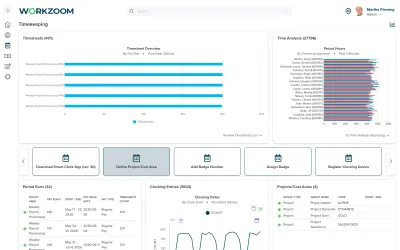
Capture hours, resolve missed punches and approve time before payroll closes.
Our clients
Benefits
Use clocking, manual timesheets or configured standard hours. Employees can record project or task time on a timesheet and submit it for manager review.
Review missing punches, early or late clocking and extra time. Correct what happened and record the approval decision rather than reconstructing the week at payroll close.
Configured overtime, premium and meal rules apply to recorded time. Approval and the Time Cut Off Date determine which time the pay run picks up.
Shift workers can clock in and out; timesheet users can enter hours or start and end times. Configured standard hours can populate from a schedule, with additional work recorded as an exception.
Daily Time Batches surface variances against the schedule. A manager can correct a missing punch, review extra time and add notes. On-schedule hours still need the approval required for payroll processing.
Workzoom applies configured daily, weekly and period rules to recorded time, including overtime, premiums and meal deductions.
Your team defines the policy and the employee groups it applies to; a location label does not create a legal rule.
Approved time can reach Workzoom payroll without an export between the modules. The timesheet must align with the payroll period and be approved before the Time Cut Off Date.
Late approval requires adjustment in a later cycle.
Timekeeping policy defines rounding and tolerance rules. Geo tracking records clocking location; geo fencing limits clocking to a permitted range where supported.
These controls support review, rather than guaranteeing attendance or removing the need for corrections.
Each requirement below is set up for your employee groups. Your team confirms which rules apply.
Source: Ontario ESA, overtime pay
Source: Ontario ESA, public holidays
Source: Ontario ESA, record-keeping
Capture, correct and approve time before the payroll cutoff.
Review missing punches and differences between scheduled and recorded hours.
Only approved time can feed payroll.
Later approval requires a subsequent-cycle adjustment.
Proof
Real teams. Real payroll runs. Hours back, every cycle. View all case studies

Before Workzoom, we were buried in spreadsheets. Now HR is so much simpler. We spend less time on admin and more time supporting our staff and residents every single day.


We would not be able to hire the way we do with the same resources. It has kept our headcount consistent without growing it, saving us time and money every single cycle.


Switching to Workzoom made managing payroll and timekeeping so much easier. We processed our first payroll faster than we expected and now feel far more confident in everything we do.
The story
The story
Different Canadian workforces capture time differently. Office staff can use self-service clocking or manual timesheets. Field teams can use mobile clocking, and shift teams can use configured terminals or kiosk badges. Supervisor corrections follow the review process rather than adding a capture method. Choose methods and location controls around your workforce and privacy policies.
Whichever method captures the punch, the same configured rules engine applies daily, weekly and premium calculations. Ontario's general overtime threshold is 44 hours in a week under the Employment Standards Act, but exemptions and special rules may apply. Validate employee eligibility and the applicable policy before approving time for payroll.
The story
Northern Sunrise County's workforce swings structurally between 90 and 140 employees as summer construction and road maintenance staff up and winter scales the team back down. Different job types used different timesheet formats, a gap the county's prior systems handled inconsistently and that had eroded trust in the numbers.
On Workzoom, the county's Canadian payroll engine, multi-format timekeeping, scheduling, personnel records and leave management run on one platform. The county's first payroll on the new system ran less than three months after the project started, and last-minute corrections that used to take hours now complete in minutes.
The story
Canadian time and attendance software should make variances visible without treating routine time as already approved. Workzoom surfaces daily exceptions for managers to resolve, and only approved hours are included in payroll processing. Test a missed punch, a corrected time entry and an ordinary on-schedule shift to see the full approval path.
With Workzoom Timekeeping and Payroll configured together, approved hours feed the aligned payroll period with the configured time rules applied. Approval must reach payroll before the time cutoff. Payroll administrators still review the resulting pay; connecting the records does not remove that responsibility.
For a synthetic evaluation, use an employee who clocked in but missed the clock-out. Ask the manager to correct the daily exception and approve the time, then compare the categorized timesheet hours with the payroll input. Repeat with approval after the cutoff and confirm which later cycle receives the correction.
Canada pricing
250 employees · HR · CA$4 per employee, per suite
No initial setup fees, no long-term contract. Implementation, migration, and training included.
Ready to run Canada timekeeping?
Explore your suite options, pricing and fit in a 15 to 60 minute working session. For organizations with 50 or more employees. See our minimums.