 Canada
 United States
 Bahamas
Employee goal setting
Connect company priorities to progress notes and better performance reviews.

Employee goal setting works when each person knows the company priority, their contribution, what completed work looks like and when to discuss progress. Keep the goal, evidence and next action together. Then the performance review can start with what happened, rather than a search through old forms and someone's memory.
The review is tomorrow. Your employee remembers January's target. You remember March's revised priority. Neither explains the project being put on hold. Use the goal worksheet to agree one objective, then keep the updates that explain what changed.

What does a useful employee goal look like?
Start with a result the role can influence. "Improve customer service" names a direction. It doesn't tell a supervisor what to change tomorrow, or what evidence to bring to the next conversation.
The example below is fictional. It shows how to structure a goal, not a customer outcome or a promised Workzoom result.
| Part of the goal | Illustrative example |
|---|---|
| Company priority | Give customers a reliable answer about their open request. |
| Employee contribution | A service supervisor introduces a shared handoff for unresolved requests. |
| What completed work looks like | Each unresolved request has an owner, the next action and an agreed follow-up date before the shift hands over. |
| Evidence to discuss | A sample of handoff records, missed follow-ups and the reasons they were missed. |
| Support needed | The manager agrees who covers a request when its usual owner is away. |
| Next check-in | Review the first week of records together. Decide what to keep, change or clarify. |
Scroll sideways to read the full worksheet.
The company owns the customer-service result. The supervisor owns an agreed contribution to it. Those are connected responsibilities, not identical targets.
Acas's guidance on setting objectives similarly recommends goals that are achievable and relevant to the person's role, with progress discussed in check-ins. This is a UK management resource, not Canadian or Bahamian legal advice, and it does not verify Workzoom features.
Cascading goals should explain the connection
Ask three questions before assigning an objective:
- Which company or department priority does this work support?
- What can this person influence within their role?
- What evidence would help both of you judge progress fairly?
If the answer depends on another team, name that dependency. A supervisor cannot fix a missing approval by working harder. Record who needs to decide, what they need to decide and when the work can continue.
In Workzoom Performance, employee objectives can be linked to active business goals. Agree the connection with the employee. Software doesn't make an unclear goal useful by assigning it.
What belongs in a progress update?
A status tells you where the goal stands. A note explains why. Keep the update short enough that an employee can maintain it and specific enough that their manager can act on it.
"The handoff record is in use. Requests have named owners, but weekend cover is still unclear. Please confirm the cover arrangement before the next weekend shift. We'll check the missed follow-ups at our next meeting."
That note gives the manager a decision to make. "Making good progress" does not.
If you use a completion percentage, agree what it measures. Half the tasks completed is not necessarily half the result achieved. Keep the evidence and the remaining work beside the number.
Workzoom objective updates can capture status, completion percentage and progress notes, with saved updates time-stamped. Confirm how frequently updates can be saved in your configured process. That gives the next review something more specific to discuss than the latest percentage alone.
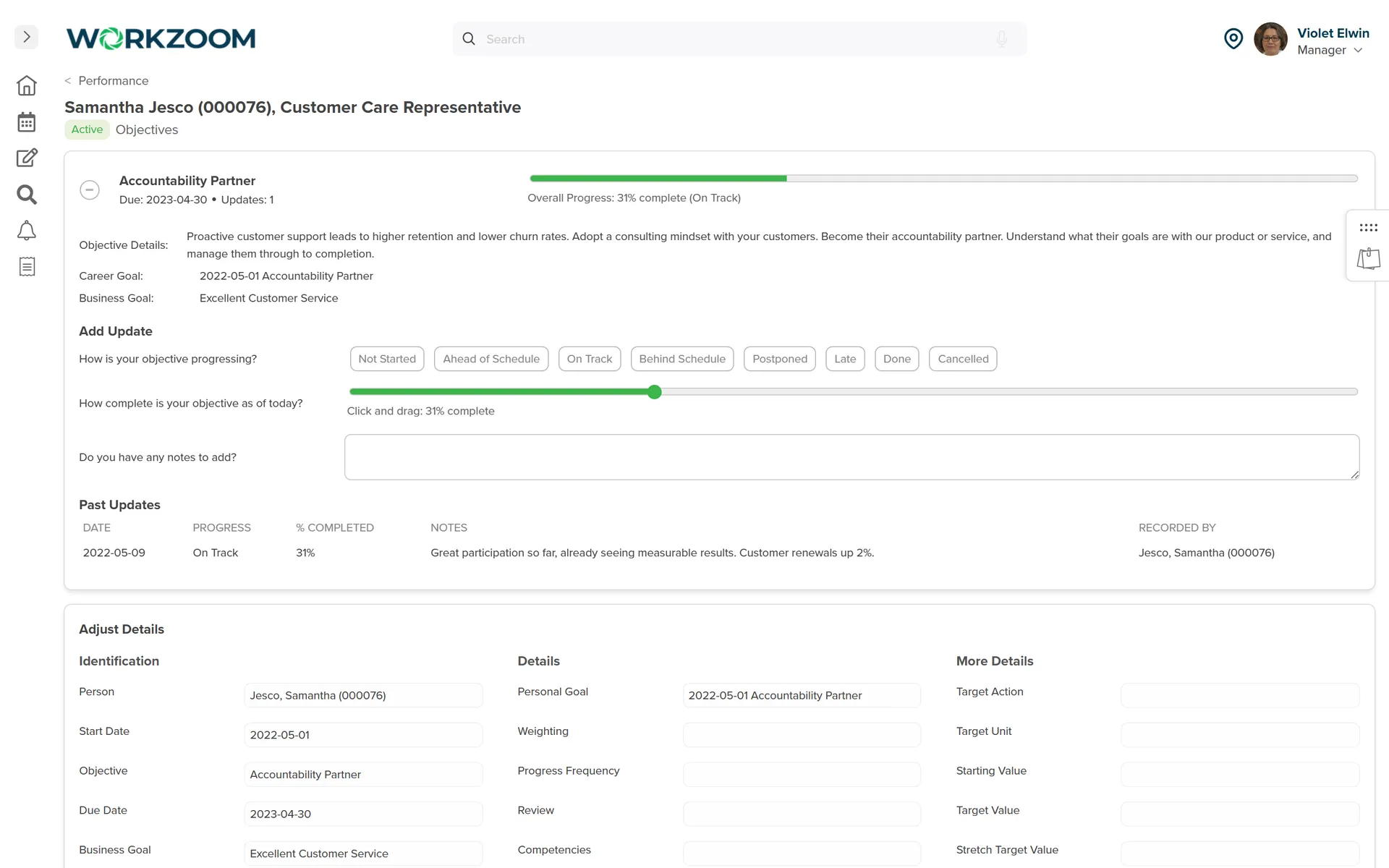
If your manager needs to spot stalled work, ask how they can see objectives by owner, due date and progress. Do not assume every update or overdue objective sends an email or becomes a red warning. Check the reporting, task prompts and notification behaviour in your configured workflow.
Test visibility separately from reminders
Bring one objective with a due date and two progress updates to the walkthrough. Ask the demonstrator to switch from the employee's view to the manager's view, then open the objective-progress and update reports available to that role. Can the manager find the blocked goal and read what help is needed?
That is a different test from whether an email arrives automatically. Ask for the exact reminder behaviour you need to be shown, not inferred from a report list.
What happens when the goal changes?
Don't judge someone against a target that quietly moved. When the priority changes, record:
- The original agreement and the date the change was made.
- Why it changed, including any blocked work or missing resource.
- The revised result, owner, support needed and next check-in.
- Which work already completed still counts towards the goal.
In the handoff example, suppose the weekend service is paused. Agree whether the goal now covers weekday requests only. Keep the work already done visible and record who made the decision. At the review, both people can distinguish a changed priority from an unmet commitment. That distinction is what keeps employee accountability fair.
Bring two views to the performance review
Ask the employee and manager to look at the same goal and evidence before the meeting. Where their accounts differ, ask what changed and what support was needed. Did you agree what success meant? Are you looking at the same period? Is important work missing from the record?
Workzoom's configured employee and manager assessment steps can collect both perspectives. A manager can compare the self-assessment with their assessment to focus the conversation on where the views differ. The comparison supports a discussion, not an automated verdict.
Use the performance review examples to turn those observations into specific feedback. The performance review template gives you a structure for the conversation.
Where Workzoom fits
Bring the handoff example, or one of your team's real objectives, to a Workzoom Performance walkthrough. Ask to see:
- How the objective records an employee's contribution to a business goal.
- Where the employee or manager records status, completion and progress notes.
- What the manager can see in progress reporting, including a blocked objective.
- How the employee and manager assessments inform the review conversation.
Your enabled modules, permissions and review configuration determine the available steps. Confirm who can view or change objectives, how often updates can be saved and how your review process handles a changed goal. The worksheet is a management method, not a promise that every field or decision is automated.
Software can hold the record and route the work. It cannot decide whether the goal was reasonable or replace the manager's conversation.
If the workflow fits your team, check the required suites, scope and minimums on the pricing page before comparing costs.
Start with one goal you already have
Choose an active objective. Add the evidence you expect, the support needed and the next check-in. Ask the employee whether the record matches their understanding. Fix the gaps together.
You don't need a larger annual form. You need a goal both people can return to.
How useful was this page?
What should we improve?
What readers ask after this post on employee goal setting.
Our clients
The teams that run their people on Workzoom.













Workzoom handles HR, payroll, workforce, and talent on one employee record. Book a Walkthrough.
Related reads
View all in Talent

Get started
Built around your org. See it run live.
Explore your suite options, pricing and fit in a 15 to 60 minute working session. For organizations with 50 or more employees. See our minimums.